

Case study
2Study
Study smarter. Plan automatically.
2Study is a native study planner for university students. It organizes courses, exams, assignments and study sessions, turns the hours a student has into a day-by-day plan, and adapts it when a session is missed.
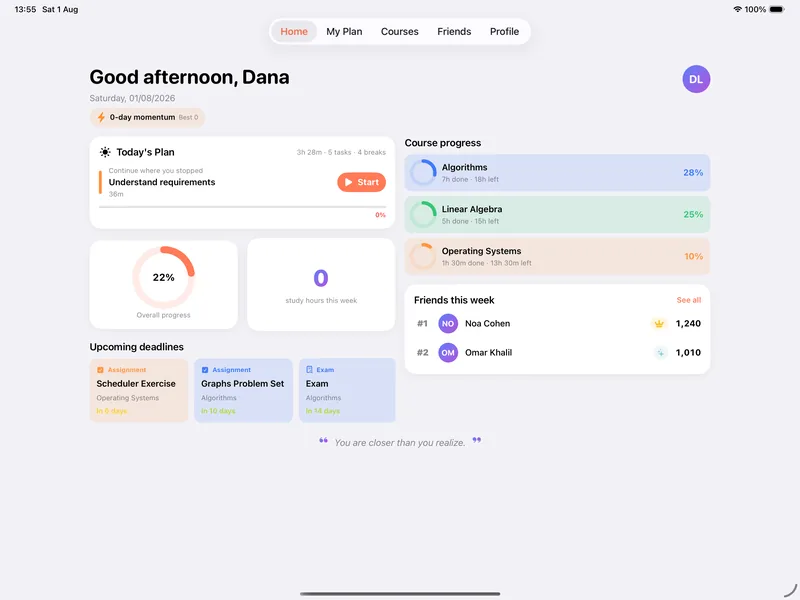
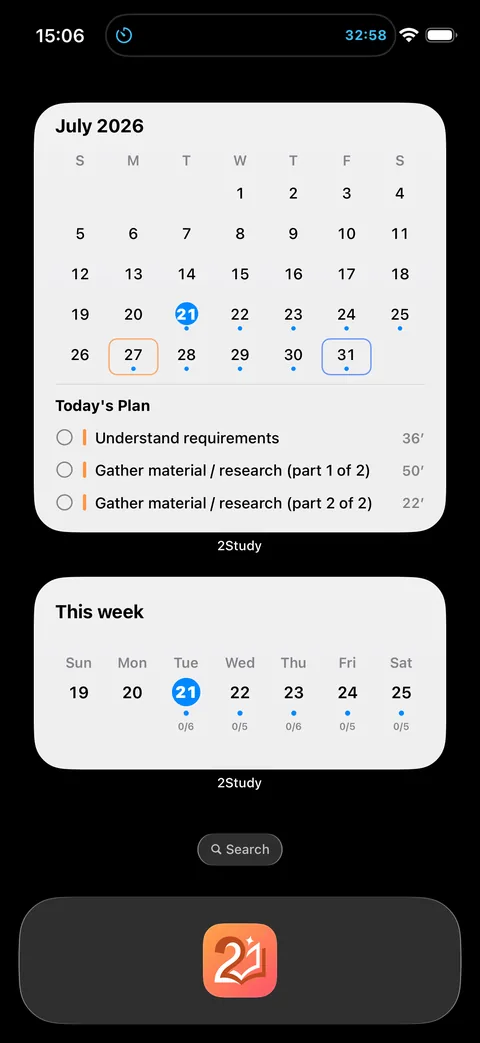
- Role
- Product, design and engineeringiOS, Android, backend, testing and release
- Platforms
- iPhone and iPad, iOS 17 or laterAndroid version in development
- Languages
- English, Hebrew and ArabicFull right‑to‑left layouts
- Released
- 20 July 2026iPad support in 1.7, 1 August 2026
Overview
A planner that does the planning.
Students add their courses, exams and assignments and say how much time they have. 2Study builds the plan, tracks progress against it and keeps it realistic as deadlines approach.
It is two native apps on one shared Firebase backend: Swift and SwiftUI on iOS, Kotlin and Jetpack Compose on Android. Version 1.7 is on the App Store for iPhone and iPad. Version 2.0, which grows 2Study from exam planning to the whole semester, has been submitted to Apple for iPhone and iPad and is in App Review or waiting for it. It isn’t released yet. The Android app, including its 2.0 work, is in development and has not been publicly released.
It is localized in English, Hebrew and Arabic with full right-to-left layouts, and it follows the conventions of Israeli universities and colleges, such as Moed A, B and C exam sittings.
Problem
Many deadlines. Limited hours.
A semester means several courses, each with its own exams and assignments, and only so many free hours a day. Turning that into a realistic schedule is work in itself.
Then the schedule has to keep working when the day changes.
What a plan has to cope with
In 1.7, missed work moves to the next day or the whole plan adapts. Named actions for a sick day or a short day, and a lighter exam day, come in 2.0. 2Study is designed around students at Israeli institutions: Moed exam sittings, and Hebrew or Arabic as a first language.
Solution
Add the work. Get a plan.
-
Add courses and deadlines
Courses, exams and assignments, each with a priority and difficulty, and the Moed sitting the student plans to take.
-
Set the hours
Available study time, and how to mix courses: one at a time, a chosen set, or automatic.
-
Pick a plan
Three plans, Balanced, Early Finish and High Flexibility, each an ordered checklist for every day.
When a session is missed, the work moves to the next day or the whole plan adapts. Around the plan, the app keeps students going: a focus timer with walk breaks, home-screen widgets, a Live Activity on the Lock Screen, streaks, a weekly review, and private leagues with friends.
Inside the app
A day with 2Study.
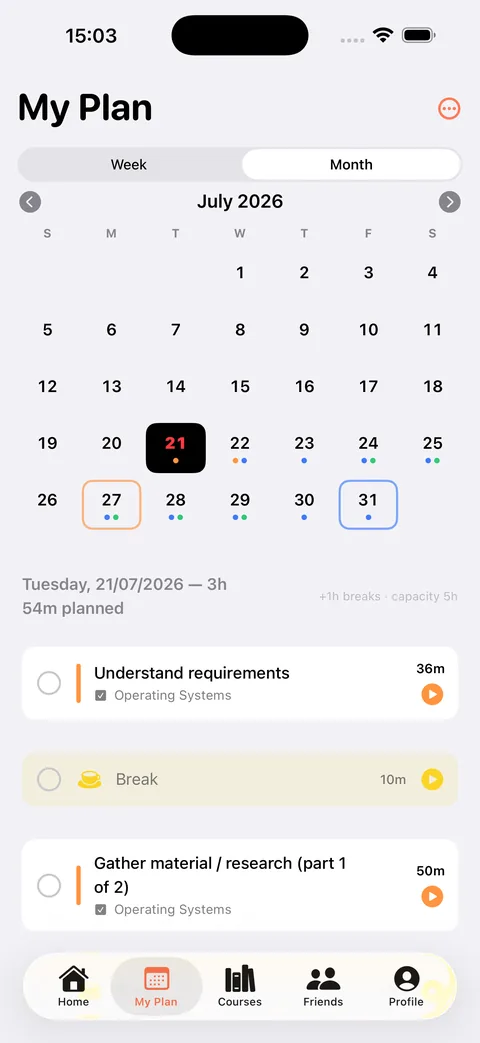
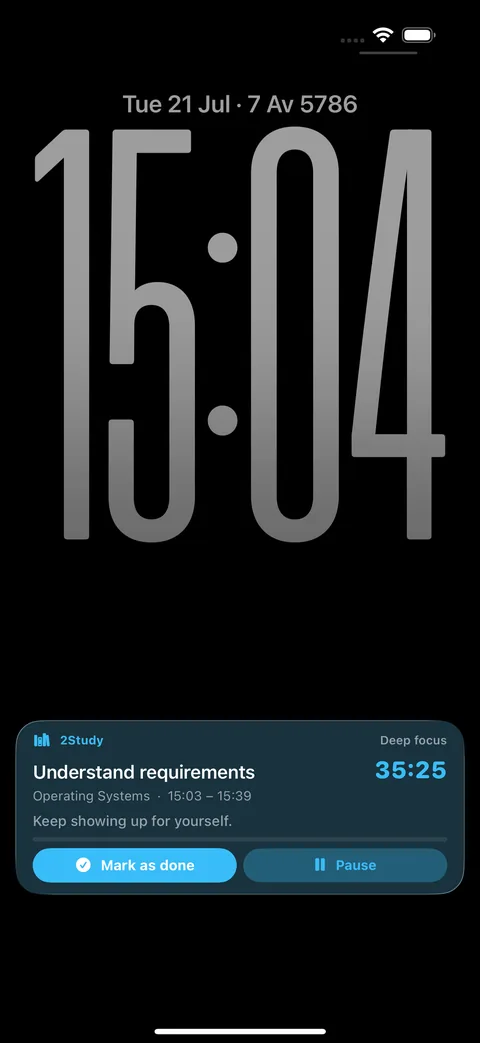
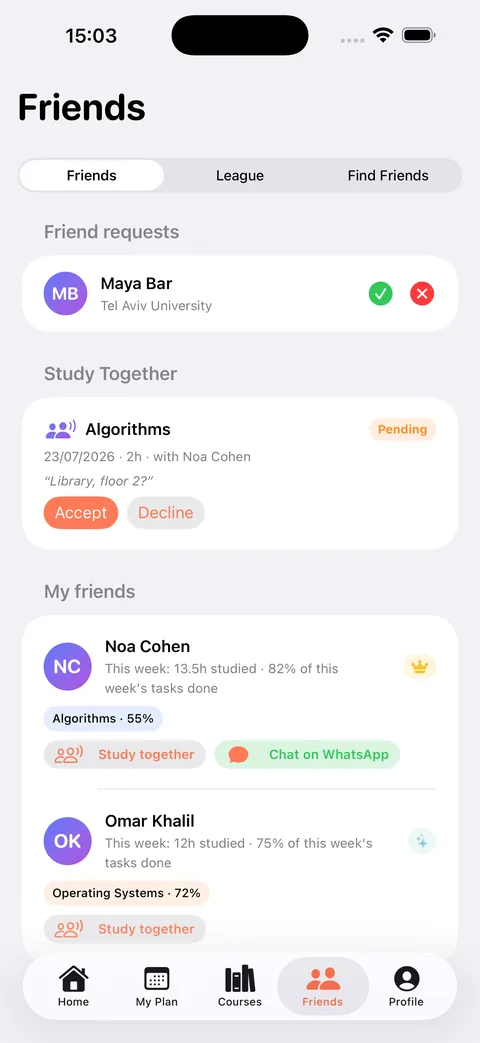
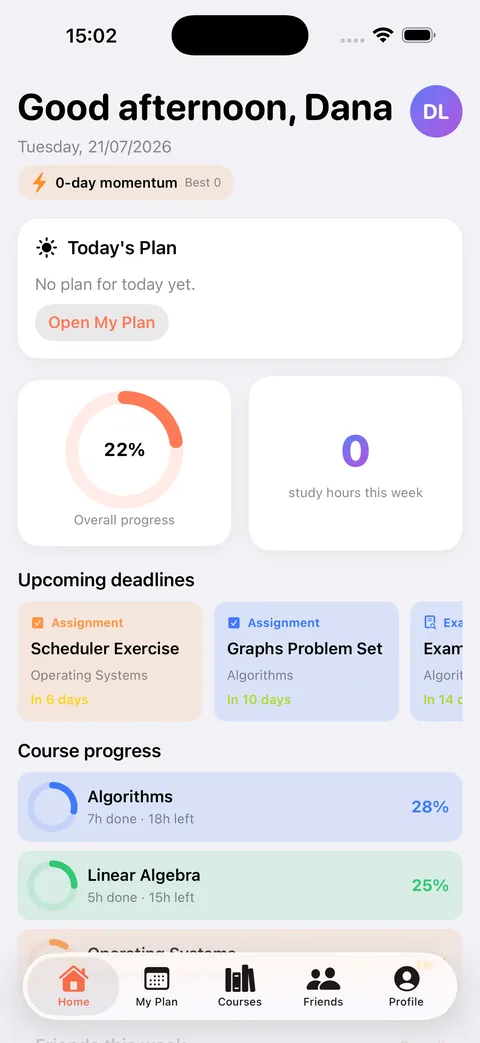
Screens from the App Store listing. The names and figures on screen come from a demo account.
Design
Colourful, calm and native.
2Study is built from the system’s own components, SF Symbols and grouped backgrounds, then adds colour where it carries meaning.
Every course gets one of 20 named colours. Breaks are always yellow, and walk breaks green. Cards use 20-point continuous corners and a soft shadow, and students choose Light, Dark or Auto appearance.
- Accent, light#FF7A57
- Accent, dark#7995FF
- Brand gradient#597AFA → #AD52DE
- Break#FAD424
- Walk break#33C773
One look on both platforms
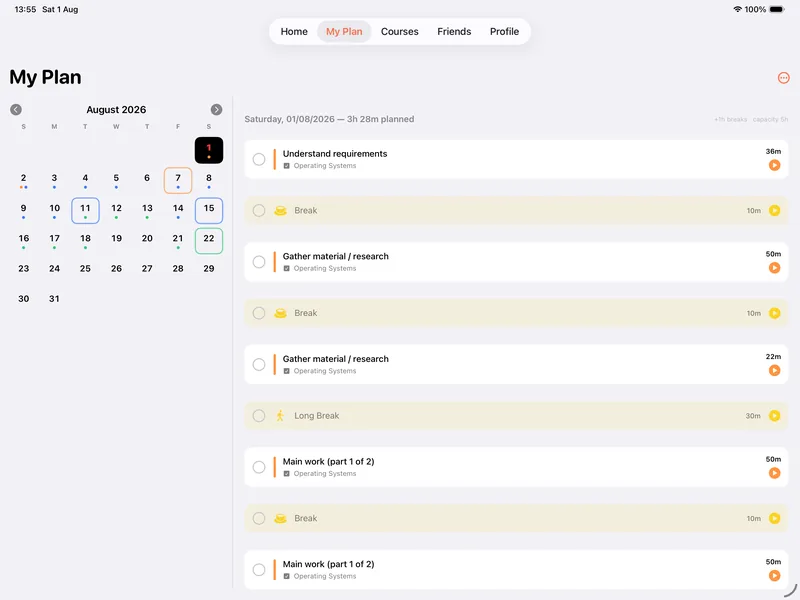
The Android app was planned as standard Material 3. Once the decision was made that both apps should look identical, its controls were rebuilt in Compose to match iOS, from the tab bar and forms to alerts, wheel pickers and blurred glass sheets. Sizes and the type ramp are measured from iOS simulator captures rather than guessed, and Material You dynamic colour is off so the brand stays fixed. The platform integrations stay Android-native: Glance widgets, a foreground-service timer and per-app language settings.
Key features
What it does today, and what’s next.
Available now in 1.7
On the App Store-
Automatic study plans
Three deterministic plans from deadlines, estimated work and available hours: Balanced, Early Finish and High Flexibility.
-
Courses, exams and assignments
Priority and difficulty for each item, 20 course colours, and Moed A, B and C sittings, where only the planned sitting feeds the plan.
-
Daily checklist and calendar
My Plan as an ordered list with Week and Month views, manual tasks and breaks, and a flow for unfinished work.
-
Focus timer
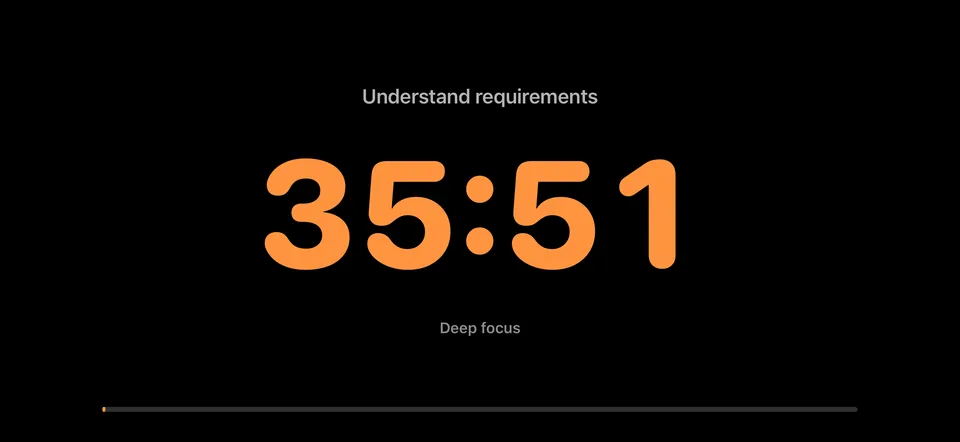
A timer sheet, a full-screen mode and an active-timer bar, walk reminders with 2- or 5-minute walk breaks, and a chime at the end of a session.
-
Widgets and Live Activity
Today’s Plan and Study Calendar widgets, and a Lock Screen and Dynamic Island timer with an interactive Mark as done button.
-
Shortcuts and Focus
A Start Focus Session shortcut, and a guided setup that pairs it with an iOS Focus to silence notifications.
-
Reminders
Local notifications for the start of the day, exams, assignments, falling behind, unfinished tasks and the weekly review.
-
Progress and weekly review
Progress tracking, streaks, a celebration when the day is done, and a weekly review every Sunday.
-
Academic record
Completed courses with credits, grade attempts, a chosen grading scale and degree averages.
-
Friends, leagues and achievements
Friend requests, Study Together invites, weekly leagues across eight tiers, 28 badges, and WhatsApp or email with accepted friends.
-
Accounts and sync
Email sign-in, offline-first sync, a full restore on a new device, data export and account deletion.
-
iPad
Since 1.7: every orientation, with layouts for the iPad’s larger size class.
Coming in 2.0
iOS submitted, Android in developmentNot released yet
2.0 for iPhone and iPad has been submitted to Apple and is in App Review or waiting for it. The App Store still offers 1.7, and these features may change before release. The Android version is still in development.
12 features, not released yet
-
Dashboard
Replaces Home: classes, tasks, deadlines, free periods, and daily and semester progress in one place.
-
Weekly timetable
Recurring classes with one-off changes and cancellations. Classes reach the planner as busy time.
-
Calendar import
Import a university .ics calendar through a hand-written parser, so no calendar permission is needed. Importing again changes nothing, and exams are never guessed.
-
Attendance
A prompt after each class, attendance for each course, and catch-up work for missed classes.
-
Course workspace
Overview, Materials, Community, Attendance and Grades for every course.
-
Course files and sharing
A private file library for each course, and view-only sharing with friends that can be revoked. Sharing works once the 2.0 security rules are live.
-
Community library
Shared course files with moderated submissions, reports and an audit log. Publishing goes through a server function, and no library has been published yet.
-
Smart Actions
15 named actions: 7 that change the plan, such as “Move today’s unfinished work” or “I’m sick today”, each proposed, reviewed, approved and undoable, and 8 read-only questions. No AI and no free text. Comes with 2Study Pro.
-
Institution picker
33 Israeli institutions, all named in English and Hebrew and 10 also in Arabic, with manual entry for any other. The list isn’t officially verified.
-
Pinned tasks
Hand edits survive regenerating the plan. An exam day the student can study after loses 4 hours of study time instead of counting as a full day.
-
Classes widget
Today’s classes on the Home Screen, in small, medium and large sizes, with 2Study Pro.
-
Android
In development, not on Google Play. All 20 planned 2.0 work packages ported, screens rebuilt to match iOS, Glance widgets, and a push client for friend requests.
Architecture
Two native apps. One backend.
2Study isn’t a cross-platform app. Each platform is written natively, Swift and SwiftUI on iOS and Kotlin and Compose on Android, with no shared UI runtime. They meet at one Firebase project, with the same accounts, documents and security rules, so one account will work on both once the Android app is released.
Client · on the App Store
iOS and iPadOS
- Swift 6 and SwiftUI, iOS 17+
- MVVM, repositories, dependency injection
- Persistent offline cache, newest write wins
- Widgets fed from an App Group snapshot, and a focus Live Activity
- Local notifications only
- App Attest for App Check, in 2.0
Shared backend
Firebase
- Authentication: one account for both apps
- Cloud Firestore: the same documents
- Cloud Storage for photos and files
- Security rules: the 2.0 rules are tested on the emulators
- App Check, in 2.0: installed, not enforced
- Cloud Functions: purchase records live; push and community publishing written
2Work, in development, signs in to the same project and keeps its data in its own namespace.
Client · in development
Android
- Kotlin and Jetpack Compose, Hilt
- Layers: ui → domain → data → core
- Persistent offline cache, newest write wins
- Glance widgets from a DataStore snapshot, and a foreground-service timer
- Push client for friend requests
- Play Integrity for App Check, in 2.0
Both apps read and write the same Firestore documents under one written model contract. The rules and indexes live in the iOS repository, and Android’s real writes can be replayed against them on the emulators. App Check comes with 2.0 and isn’t enforced. Two Cloud Functions that keep purchase records were recorded live in October 2026; the friend-request push and community publishing functions are written.
Inside the iOS app
- Pattern
- MVVM with repositories and dependency injectionView models are @Observable classes on the main actor
- Models
- Codable, Sendable value typesEvery synced record carries an id, createdAt and updatedAt
- Services
- Planner, progress, scoring, grades, focus timer, notifications, sync and storageThe planner is a pure, deterministic struct
- Repositories
- 9 protocols in 1.x, 17 in 2.0Each has a Firestore and an in-memory version; demo or live data is chosen at launch
- Extensions
- Widgets and the Live ActivityThe widgets read an App Group snapshot; the Live Activity shares its contract with the app
Inside the Android app
- Stack
- Kotlin 2.2, Jetpack Compose and HiltOne activity with Navigation Compose
- Layers
- ui → domain → data → coreEach layer imports only the layers to its right; the domain layer has no Android or Firebase imports
- Domain
- Pure Kotlin, ported from iOSPlanner, scoring, achievements, grades and weekly review, so the iOS tests could be ported to JUnit
- Data
- Flow-based repositories over Firestore listenersSettings in DataStore reuse the iOS key names
- Platform
- Glance widgets, a foreground-service timer and scheduled remindersThe timer runs as a foreground service with an ongoing notification, and reminders use AlarmManager and WorkManager
How a change reaches every screen on iOS
-
Write locally
A view model calls a repository, and Firestore writes to the on-device cache first, so it works offline.
-
Sync
The write syncs when there’s a connection. A network path monitor drives the offline banner.
-
Merge
Listeners bring in changes from other devices. Conflicts resolve per document: the newest update wins, with an “Updated from another device” notice.
-
Widgets
After each plan change, the app publishes a ready-to-display, pre-translated snapshot for the widgets.
-
Live Activity
The focus timer mirrors its state to the Live Activity, which counts down by itself.
On Android, Flow repositories over Firestore listeners do the same job, Glance widgets read a DataStore snapshot, and a foreground service with an ongoing notification takes the Live Activity’s place.
Technology
The stack.
- iOS
- Android
- Backend
- Tooling
- Versions
-
- Firebase iOS SDK 12
- Firebase Android BOM 34
- Compose BOM 2025.06
Localization
Three languages. Two directions.
-
English
-
עברית
-
العربية
- 1.x catalog
- 905 string keys876 English, 874 Hebrew and 874 Arabic translated
- 2.0 catalog
- 1,697 string keys1,665 English, 1,661 Hebrew and 1,661 Arabic
- Android
- Generated from the iOS catalog1,558 strings and 52 plurals per language
-
Chosen in the app
The language is picked on the first screen, independent of the device language. The layout direction follows it, and widgets receive their text already translated.
-
Right to left everywhere
SwiftUI’s direction is set at the root, and UIKit-backed lists, forms and tab bars are forced to follow the app’s language too.
-
Mixed-direction text
Phone numbers are wrapped in directional isolates, so they read correctly inside right-to-left sentences. The Android app in development isolates names too.
-
On Android
Strings are generated from the iOS catalog. The app language is set per app and declared in a locale config, Hebrew is packaged as both values-he and values-iw, and Western digits are pinned in resources.
-
An Israeli locale with Western digits Coming in 2.0
2.0 pins each language to
<lang>_IL@numbers=latn, for a 24-hour clock in every language and Western digits in Arabic. It uses the ICU form because Foundation can’t parse the BCP-47 one for English. In 1.7, each language keeps its default formats. -
Real plural rules Coming in 2.0
In 2.0, plurals follow the selected language rather than the device’s, so Arabic gets all six of its plural forms and Hebrew its dual.
Engineering challenges
Problems worth solving.
-
One planner, two platforms, identical output
The planner is a pure, deterministic engine. It always offers three plans, weighs urgency with an 85% soft cap, keeps lecture chains together, inserts breaks, adds review days before exams, and regenerates without losing completed work. The Android port has to produce the same plan from the same input, so the 54 iOS test suites that existed at the port were mapped to Android: 32 under the same name, 11 as equivalents, 5 ported, 4 checked in code and 2 not applicable.
-
Blank days at the start of a plan
The daily pacing budget was a hard ceiling, so a day whose budget was smaller than one lecture that can’t be split stayed empty, and the error compounded: ten 90-minute lectures with an exam in 20 days left days 1 to 10 blank. The budget is now a target and the day’s capacity is the real limit, fixed in the current codebase on both platforms.
ReducedCapacityDayTests
-
A crash hidden in the data shape
Firestore doesn’t allow nested arrays, and a plan that mixed courses stored its groups as one. Every save raised FIRInvalidArgumentException, an Objective-C exception that Swift’s do/catch can’t catch, so the app crashed. Groups are now saved as an array of maps, and the old shape still loads.
MixGroupWireTests
-
Keeping the timetable out of the planner
Classes and free gaps reach the planner as availability exceptions, prepared before it runs, so the engine never reads the timetable. Later 2.0 work did change the engine: week-by-week plans, repeating homework, and class reviews, which the caller builds from the timetable and passes in. All six original planner test files still pass unedited.
-
Changing the data model under live users
Saves overwrite the whole document and reads skip any record that fails to decode, so one new required field would make old data silently disappear. Every new field is optional, no new task type was added that older builds couldn’t decode, and migrations are safe to re-run and never destructive.
-
Keeping iOS and Android compatible
A written model contract fixes field names, enum values and timestamps. Tests check that an Android save keeps the fields only iOS writes, after a bug where Android saves erased iOS course fields and task pins, and that IDs both platforms derive match, even under an Arabic locale. Android’s real writes were replayed against the shared rules, most recently in early October 2026.
android-wire.test.mjs
-
Writes that looked saved but weren’t
The offline cache confirms a write on the device, so a server rejection, such as Firestore not being set up or rules not deployed, only shows in the write’s completion. Those completions are now logged, and a guard catches sessions that have no profile document.
-
Widgets and a Live Activity without logic
The widget process doesn’t share the app’s language settings, so the app hands it ready-to-display text through an App Group snapshot. The Live Activity counts down with Text(timerInterval:), so it needs no per-second updates. On Android a foreground service takes its place; a launch-time crash loop, where the service could stop before calling startForeground(), was found and fixed.
-
Planning a safe App Check rollout (2.0)
The App Check provider is installed before Firebase is configured, and on Android before Hilt creates any client, so the first requests can be attested. Release builds use App Attest and Play Integrity, debug builds a debug provider. Enforcement stays off until store builds without App Check are gone, so no existing user is locked out. The console steps, registering App Attest and Play Integrity and checking Play Integrity’s quota of 10,000 checks a day, are a separate part of the rollout.
-
Tests that pass, code that’s never used
A review found five pieces of code that were fully tested but unreachable from any screen. Each one was wired up or deleted.
-
Matching iOS on Android
An audit against iOS simulator captures found about 300 visual differences, fixed on the Android 2.0 branch. Along the way, the Android app fixes 34 iOS defects instead of copying them, each recorded in a deviations log. One example: a Free Time Assistant setting that exists on iOS but can’t be reached from any screen.
Testing
Tested where the logic lives.
-
1,573
iOS tests
XCTest, in 111 test classes. The last recorded run, on 4 November 2026, had 0 failures and 1 optional test skipped.
-
1,824
Android tests
1,816 JVM unit tests and 8 instrumented tests, counted from source.
-
273
Security-rules tests
273 passed and 1 was skipped in the last recorded run on the Firebase emulators, on 30 October 2026. The skipped test replays Android’s real writes. That replay was last recorded in early October 2026, when all 166 tests in the run passed.
The iOS and Android figures are counted from the test sources of the unreleased 2.0 code, November 2026: 3,397 app tests in total. The last recorded Android unit-test run, on 25 October 2026, passed all 1,816 tests. The 1.x code has 205 iOS tests. There is no UI-automation suite yet.
-
Planner tests on both platforms
Android’s domain layer is pure Kotlin, so the iOS planner tests could be ported to JUnit and hold both engines to the same results.
-
Localization tests
Checks for Western digits, the 24-hour clock, translations in all 20 feature areas, and plural categories on both platforms.
-
A replay of real writes
Android records its actual Firestore writes, and a script replays them against the shared security rules on the emulators. The rules have changed since the last recorded replay.
-
Manual sweeps
The Android app was checked in all three languages, light and dark, at phone and tablet sizes, and compared with 268 iOS simulator captures.
Platform support
Where it runs.
- iPhone
- iOS 17.0 or later, portraitTurning it sideways during a focus session shows the full-screen timer. Home Screen widgets, and a Live Activity on the Lock Screen and in the Dynamic Island.
- iPad
- iPadOS 17.0 or later, every orientationLayouts for the larger size class, since version 1.7
- Android
- Android 8.0 (API 26) or later, targeting API 36In development. Phone layouts match iOS; tablets use a single column for now.
- In 2.0
- New shell layouts for foldable iPhonesTabs across the top when open, and a side rail when closed
Current status
Where it stands.
- 1.7 · iPhone and iPad On the App Store since 1 August 2026, free. 2Study was first released on 20 July 2026. Available now
- 2.0 · iPhone and iPad Submitted to Apple, in App Review or waiting for it. Not released: the App Store still offers 1.7. It adds the semester features above, and its 1,573 tests had 0 failures and 1 optional test skipped in the last recorded run, on 4 November 2026. Submitted to Apple
- Android All 20 planned 2.0 work packages are ported, and the screens are rebuilt to match iOS on the Android 2.0 branch. Not publicly available on Google Play. In development
- 2.0 backend The 2.0 security rules and indexes are tested on the emulators; they also cover the boundary around 2Work’s data. Two Cloud Functions that keep purchase records were recorded live on 23 October 2026. The friend-request push and community publishing functions are written. Partly deployed